HOW TO RECOVER AN UNSAVED WORD DOCUMENT IN 5 STEPS.
It happened to me many times before. I have been working on
a document and out of the blue my computer screen went blank, and I realised I didn’t
save the most recent updates!!! Well,yes - it happened to me several times. It
happened to me quite recently when I was working on meeting notes for one of my
clients. I thought I will cry as I thought I have lost few hours of my work! However,
I decided I am not going to give up as it must be a way to recover it as it has
to be stored somewhere. I knew that if I was only able to recover version from
10 minutes before the computer went off, I would be the happiest person in that
minute in the world as it would save at least 3h of work. I managed to do it
and decided I will make a post on how you can do it if it happens to you. So, how
to restore an unsaved Word file? You can find step-by-step instruction below.
Before you do
anything and start digging deep into the computer files, I recommend you check
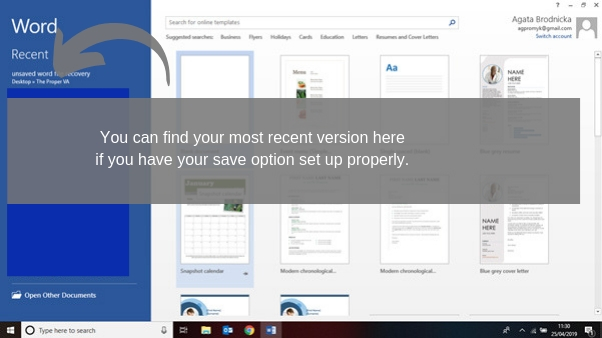
your Recent Word Files, as you might
be lucky and find version current enough there. You can check it by opening a blank
Word Document. It should show a list of the most recent documents you were
working on before the computer crashed. It would be possible if you have your
save option set up to autosave every 1 minute. Below you will also find an
instruction on how to set up your save options.
How to set up your Autosave option the o
minimise the loss of document?
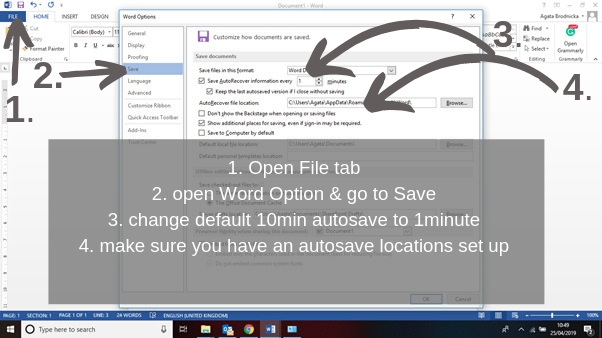
It is not as difficult as you may think. All you have to do is open a
Word document. Even blank will do. Go to File (top left) choose Options and
next Save; Now you have to make sure your autosave is set up to 1min. By
default, it is set up to 10 min. Please be aware that setting it up to 1 minute
make slow your computer down as it will be saving your work every minute. I
tend to have it set up to 5 minutes but re-set it if I have a very long
document to type up or prepare. The last thing you have to do is to make sure
your auto recovery saving path
is set up.
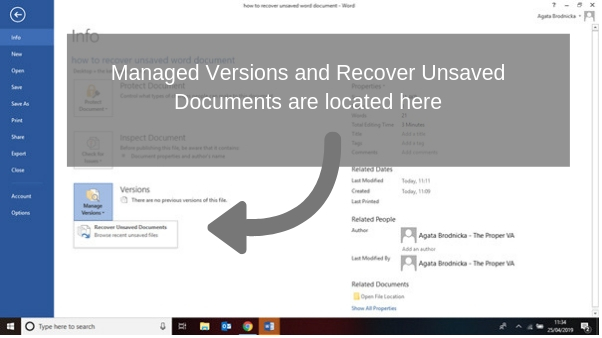
If you have not found your file in your Recent Files,
the next place you can check is Managed
Versions. You can do it when you
have a blank document open by going to File (top left corner). It will open up
a list of options to choose, and you can locate the Managed Versions on the
bottom left. However, it might be that your document will not be there. It
happened to me!
For some reason when I clicked Recover Unsaved Documents, the folder was
empty. If this happens to you, you will have to dig a bit further. However, you
might be lucky ;-).
Chances are you still have not been able to
locate your lost document. I was there and believe me; it wasn’t a nice
feeling. I had to dig further. Therefore, our next step is going to Windows folder
and checking if there is something saved in a Recovery File.
However, before we do it, we have to make sure we can see all the folders
that are there. We have to enable an option to see hidden folders.
How to enable an option to see hidden
folders
Not that complicated.
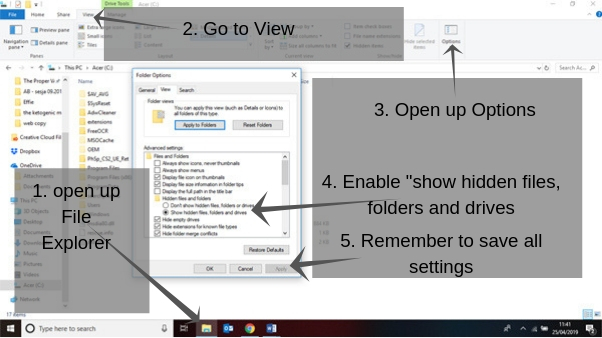
However, we have to make sure we enabled the right one. Ok, so let's open up Files
Explorer, next go and open up the View tab, find Options and open it up to
change settings.
The above picture shows how it should be set up. Please, remember to save
your new settings. Now you should be able to view all your hidden folders.
Now we have to Recover the file. Please follow it Step by step with me.
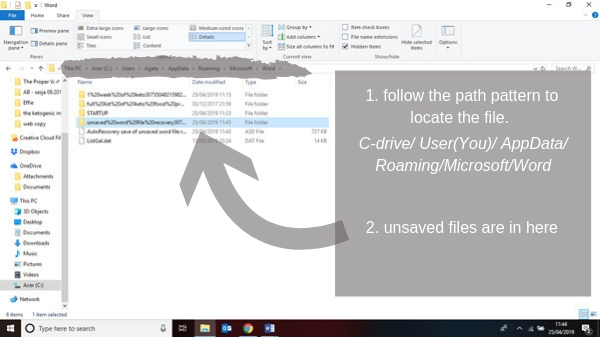
Go to your C-drive
where your Microsoft Word is installed.
Locate Users Folder, choose the
user under which you have been working on. Go to AppData, Roaming, Microsoft,
Word,
and all the unsaved documents should be there.
It might be that there are files
in there in a different format than *.docx, probably a *.asd
files.
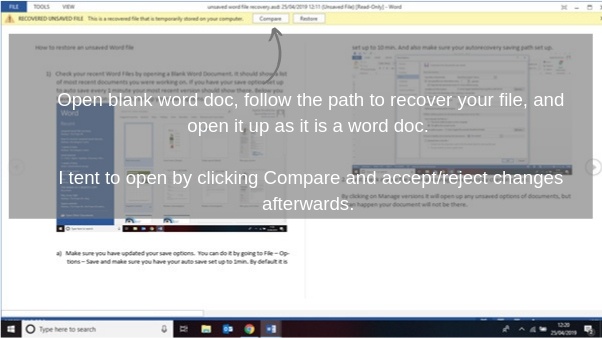
Now you have to Open up the folder you have just found. So, follow me again: open
blank Word document, go back to last saved version of the document by following
the path AppData/Roaming/Microsoft/Word and open up the most recent *.asd
file as a Word document.
That should bring up the most recently saved option of the document you
were working on.
I
usually open it up by clicking Compare,
so I see the changes that have been made over some time before the document crashed.
You can either Accept all changes or Reject depending on what you were doing
with your document. However, now after you have recovered your document Please Make Sure You Saves It Under New
Name.
How a Virtual Assistant Can Help You Build A LinkedIn Strategy.
Do you have a specific strategy in place when it comes to dealing with LinkedIn? It may be correct to say that a lot of small business owners bypass this social platform altogether, but this is increasingly a mistake due to the amount of work that the network itself has put in over recent years. Now it makes a great deal of sense to spend time on building up your LinkedIn profile and company pages, to say nothing of getting involved with their Groups feature. Maybe you need to have a detailed discussion with your virtual assistant who can operate your LinkedIn profile daily.
Even if you have a LinkedIn presence, how “fresh” is it? Just take a look at your profile for example. How up-to-date is that photograph? It’s incredible how many people use a relatively low-quality picture that they just happened to have in a folder somewhere. It shouldn’t be understated how important that first impression is and in this case your photograph needs to be professionally composed and produced and show you in the best light possible. If you are going to use LinkedIn to its fullest extent and are the type of person to attend industry conferences, meetings or events then you want to be instantly recognisable. Of course, you don’t have the time to talk to every single person at such an event, but what if that potentially lucrative contact happens to recognise you from the far corner of the room? Now you will see just how important it was to update that photograph, after all.
Nothing stands still in life in general or in your business world. Why is it, therefore, that people tend to leave their profile “as is” for an extended period of time? LinkedIn itself has made some changes to the makeup of the personal and company pages, and you should work with your virtual assistant to ensure that your profile is adequately optimised today.
You may well find that you can use some good industry buzzwords within the body of your profile to make yourself appear more relevant within your industry. Don’t be afraid to blow your own trumpet here and remember that your updates will be shared with the networks you belong to, so long as your virtual assistant has enabled the appropriate setting within your profile details.
We all know how important keywords are in our online world. Do you have the right keyword phrases in your profile summary? Have a good look at your skill set as itemised in LinkedIn. Are you missing out on search exposure because you have less than a comprehensive set of skills listed? Keep updating your profile headline often, and you will find that you have more and more visitors to your profile; this can only be potentially lucrative in the long run.
LinkedIn is part of a network of sites that your virtual assistant must maintain for you including of course your blog and your website. By keeping up to date, fresh and relevant within LinkedIn, you will be able to grow your network, enhance your visibility and drive traffic to your commercial sites.
How The VA Can Help You With A Technological Minefield
These are exciting times for any business owner. In the space of only half a dozen years, the face of marketing has changed almost beyond all recognition. Conventional methods of marketing, while still in existence, are being increasingly overtaken by the new methodology. This new approach was until fairly recent times known as “Web 2.0,” but such is the pace of development and technological advancement that many are now starting to refer to a completely new era in Internet marketing, even a “Web 3.0.” (more…)
Why Virtual Assistants Are The Right Kind Of People
In any business the cost of manpower is dominant. Did you know that it could represent as much as 80% in some cases? Business owners are often faced with a quandary. They know that taking on human resources is a considerable challenge and that there are many added costs, yet they understand that skilled labour is essential if they are to expand as they want. Quite simply, they cannot achieve what they need to achieve without the “right kind of people” helping them. (more…)
How The Virtual Assistant Comes To The Business Owner’s Rescue
Many business owners today find that writing is just not their forte. Indeed, they can deal with contracts, agreements, invoicing and so on, but they just do not feel in their element if they are asked to create an article or even a white paper of some kind. Content creation is not for everybody, yet it has become increasingly more important in the small business world. (more…)
We use technologies like cookies to store and/or access device information. We do this to improve browsing experience and to show personalised ads. Consenting to these technologies will allow us to process data such as browsing behaviour or unique IDs on this site. Not consenting or withdrawing consent, may adversely affect certain features and functions.
Functional
Always active
The technical storage or access is strictly necessary for the legitimate purpose of enabling the use of a specific service explicitly requested by the subscriber or user, or for the sole purpose of carrying out the transmission of a communication over an electronic communications network.
Preferences
The technical storage or access is necessary for the legitimate purpose of storing preferences that are not requested by the subscriber or user.
Statistics
The technical storage or access that is used exclusively for statistical purposes.The technical storage or access that is used exclusively for anonymous statistical purposes. Without a subpoena, voluntary compliance on the part of your Internet Service Provider, or additional records from a third party, information stored or retrieved for this purpose alone cannot usually be used to identify you.
Marketing
The technical storage or access is required to create user profiles to send advertising, or to track the user on a website or across several websites for similar marketing purposes.